WhyNotWin11 | Results
Open source | Release 2.7
Know exactly why your PC can’t run Windows 11. Check TPM 2.0, Secure Boot, processor support, RAM, storage and DirectX. The report shows which requirements pass and which need attention.
✓ Portable ✓ No installation ✓ LGPL-3.0
Windows 11 system checks
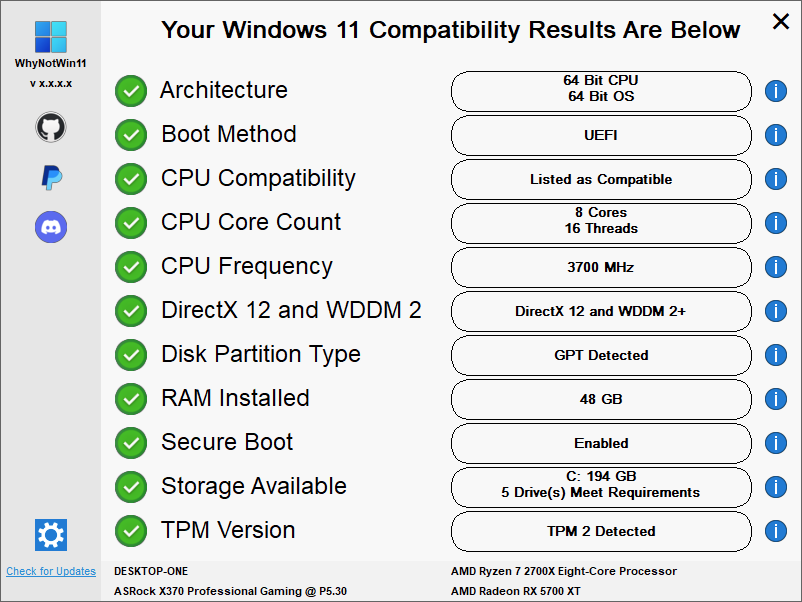
WhyNotWin11 lists the hardware and firmware checks used for Windows 11 and reports the result for each one.
See the result of each Windows 11 compatibility check in one list.
See whether TPM 2.0 is present, disabled or needs to be enabled in firmware.
Review UEFI, GPT and Secure Boot as separate compatibility requirements.
Compatibility report
Select a check to see what WhyNotWin11 tests and what a failed result can mean.
WhyNotWin11 detects whether TPM is present, enabled and meets version 2.0. It also reports when the setting may be disabled in firmware.
Product screenshots
Release 2.7 supports custom regions, text colors and background images. These screenshots come from the project release.
How it works
Get the latest stable portable executable directly from the official GitHub release.
Open the app. Administrator rights are optional for the core compatibility check.
Pass, warning and fail states show which Windows 11 requirements need attention.
Program details
WhyNotWin11 checks Windows 11 compatibility without an account or installer. The source code is available on GitHub.
WhyNotWin11 reports each Windows 11 requirement separately, so you can identify the specific hardware or firmware check that fails.
Open source | GitHub | LGPL-3.0
Questions and answers
Information abouting and using the Windows 11 compatibility checker.
WhyNotWin11 is a free, open-source Windows utility that explains which Windows 11 hardware requirements your PC passes or fails. It checks TPM, Secure Boot, CPU support, RAM, storage, graphics and other upgrade blockers in one portable app.
Use the button on this page. It points directly to the latest stable WhyNotWin11.exe published in the official rcmaehl/WhyNotWin11 GitHub releases. The tool is portable, so there is no installer.
The source code is public on GitHub and licensed under LGPL-3.0. You can review the AutoIt source, release history and checks before running the executable. As with any utility, only from the official repository.
A compatible TPM may be disabled in firmware. Look in UEFI/BIOS for Intel PTT, AMD fTPM, Security Device or Trusted Computing. WhyNotWin11 reports the state, but it does not change firmware settings for you.
PC Health Check gives a high-level eligibility result. WhyNotWin11 is built for diagnosis: it lays out individual pass/fail results so you can identify the exact component or setting blocking a Windows 11 upgrade.
Yes. WhyNotWin11 can perform its core compatibility scan without mandatory administrator rights. Some deeper system information may be more complete when it is run as administrator.
The current project documentation lists WinPE and Windows 8.1 as the minimum supported environments, with a recent Windows 10 build recommended. Other operating systems are not supported.
Official release 2.7
Run the portable program to check this PC against the Windows 11 requirements.
Free | Portable | Open source